

HBase is mainly suitable for reading the large amount of structural, semi-structural and non-structural data. Can we insert data into the HBase table, if yes is it preferable to use HBase to insert the data into the table or there are any alter ways or tools which can be used to perform the tasks? An answer to this question is yes we can load the data to the table using HBase, but loading data to the HBase is not as simple as loading to Hive Table. There are multiple steps that need to be followed to load the data to HBase Table. We can insert records one by one to the HBase or in bulk mode also.
Before going in deep how we can load the data to the HBase table, we will have a look at how we can create an HBase Table. We can use HBase shell, write code in Java/Scala, API to create the HBase table.
Create HBase Table using HBase Shell
HBase shell is one of the easiest ways to create the HBase table, you need to be familiar with the basic HBase Shell commands. As HBase supports the dynamic number of the columns, the question might strike you, while creating the HBase columns we will pass the column name then how HBase will support the dynamic columns. An answer to this question is, HBase works on the concept of the column family, we will only the name of the column family only, no cell(column) name will be provided while creating the HBase table. Let’s create an HBase Table named employee for a better understanding.
We are creating the HBase table with the employee details and want to store the emp_id, emp_name, emp_contact, company_location, location_id. These records are giving the details of the employee along with the company. We can divide these records into two column families employee_details and company_details. employee_details can include columns emp_id, emp_name and emp_email, while company_details can have company_location and location_id details. Below is the create table command for creating HBase table using HBase shell
create ‘ employee’, ‘ employee_details, ‘company_details’

Describe HBase Table

If you observe keenly, I have not given the name of any of the columns which I have stated above, I have only given the name of the column family. A question might arise in your mind how data be stored in columns now. We will pass the column name while inserting the records into the HBase table, seems awkward but it is true. As HBase supports the dynamic schema, so can decide the number of the columns on the runtime. For one insert operation, we can pass more or less column than other Insert operation.
Create HBase table using Hive
Creating an HBase table via HBase shell is an easy one, just create a table and column family but inserting the data into the table is much complex. For every single record need an insert statement. Consider a simple example, having a table with 50 columns and 10000 records, to insert these 10000 records using the HBase shell needs 50 x 10,000 = 5,00,000 insert statements which are never feasible. Another easier approach can create a Hive Table and Map it to the HBase table. While creating the table user need to set the properties for the HBase table and the table can be read from the HBase, This makes the read and writes process so simpler. Hive works on reading on schema so always fast in inserting the data and HBase well-known for the fast speed.
To demonstrate the Hive-HBase integration let us create a Hive table and Map it to the HBase.
Sample Schema:-
Create HBase table using Hive
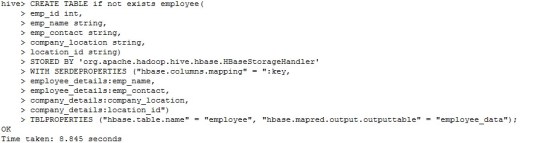
Describe the table creation
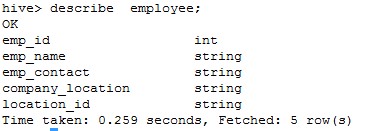
Show create table

Insert data from Hive table to Hive-HBase table

Create Hive table using API
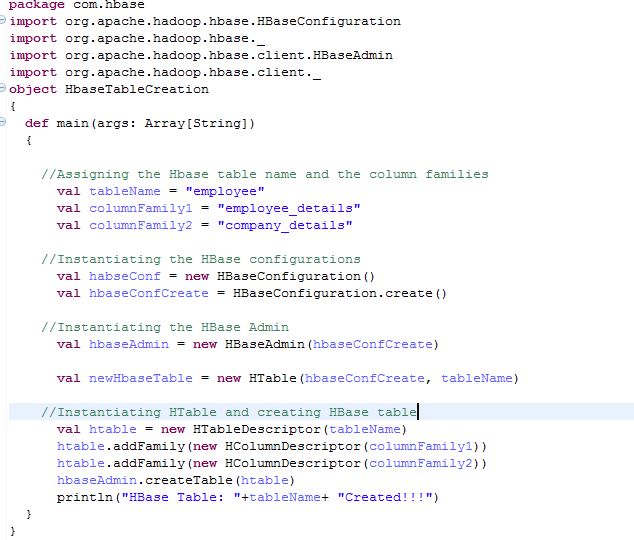
Java and Scala API can be used to create an HBase table and load bulk data in the HBase table. To perform the bulk load you must be familiar with the concept of the Scala/Java programming. I will prefer Scala over Java. Take an example to create employee table using API:-
Using Map Reduce
One of the easiest ways to load the bulk amount of the data to the HBase table is by using the Map-Reduce program. This method takes more time to load the data as compared to the Hive bulk load. We need to pass the HBase MapReduce class, CSV file name, column and table location. “hbase org.apache.hadoop.hbase.mapreduce.ImportTsv” is the class, “importtsv.separator” for giving the delimiter, “importtsv.columns” to give the columns name. Column name must start with “HBASE_ROW_KEY”
For the employee table, the command will look like:-
hbase org.apache.hadoop.hbase.mapreduce.ImportTsv -Dimporttsv.separator=, -Dimporttsv.columns=”HBASE_ROW_KEY, employee_details:emp_name, employee_details:emp_email, company_details:company_location, company_details:company_id
This is one of the simplest approaches to insert the bulk amount of the data to HBase table after Hive-HBase integration. But Map Reduce operation is not that fast as compared to inserting the data using Hive table. If you are inserting 1M records, you need to wait a couple of minutes so data can be processed.
A limitation with Hive-HBase integration is, you cannot directly load the data to Hive-HBase table. You need to create a Hive staging table and load the data to that table if you are using load data inpath command and then can insert the data from the Hive stanging table to Hive-HBase table. If your data already resides in Hive table, in this case, you v=can directly insert data to Hive-HBase table.
 hadooptech