

Cloud technologies are one of the emerging technologies. In this post, I will share the steps to delete the folder using the AWS lambda function. In AWS we can use S3 buckets to store the data. We can create the folders and the sub-folders inside the buckets depending upon our requirement. We can either directly delete the folders available in the lambda function or we can use the Lambda function to perform this step.
In this post, I will share how you can delete the existing folder and the underline files using the AWS Lambda function in Python.
Assume we have multiple folders with the same Prefix (test_folder). The folder structure is like
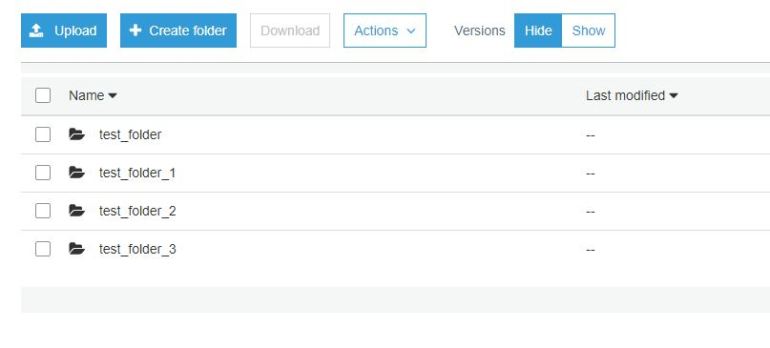
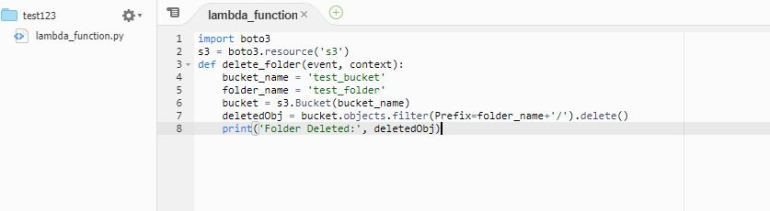
Function1: We have the objective to delete only test_folder
Import the boto3 libraries and initialize s3 object. objects.filter(Prefix=<folder_name>+’/’).delete() method can be used to delete the particular folder
Function2: We have the objective to delete all the folders staring with test_folder
Import the boto3 libraries and initialize s3 object. objects.filter(Prefix=<folder_name>).delete() method can be used to delete the particular folder
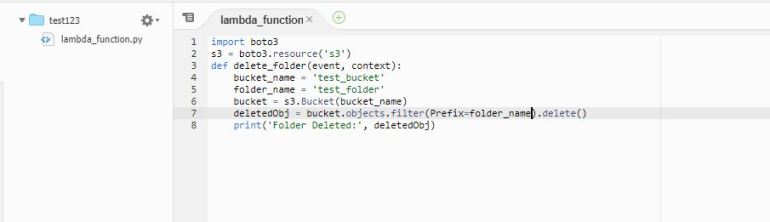
If you observe the deleteObj statement of the function1(objects.filter(Prefix=<folder_name>+’/’)) and Function2(objects.filter(Prefix=<folder_name>)). There is additional slash(/) after folder_name in Function1, which states to delete the folder folder_name and its underline structure.
Kindly share your feedback and questions and subscribe Hadoop Tech and our facebook page(Hadoop Tech) for more articles
 hadooptech